
Appeon is dedicated to continuously evolving PowerBuilder to serve your long-term application development needs while protecting your existing investments. New features and enhancements are delivered in agile 10–12 month release cycles, and each release prioritizes key areas that matter most to customers:
Dev Productivity
Empowering developers to simplify application development, reduce repetitive tasks, and write better code faster.
Compatibility
Ensuring your applications stay compatible with technology shifts, including operating systems, databases, and hardware.
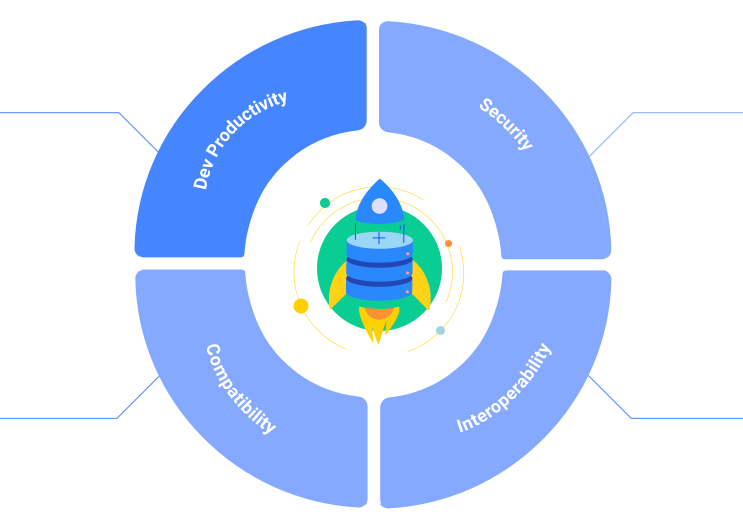
Security
Strengthening application security with best practice features and technologies to address the latest threats and compliance needs.
Interoperability
Enabling open integration with third-party services, external systems, and APIs, using dominant open standards and technologies.
Planned Features
Appeon typically introduces major new features in major versions of our products. We then revise a major version, based on customer feedback, a few times to enhance its key features, introduce new minor features, and arrive at a long-term support version.
The upcoming features we are disclosing is our minimum plan that is subject to change without notice. We are not able to publish a complete or detailed feature list, especially for revisions, since customer feedback has significant impact on our product plans. So use this information to gain a sense of what may possibly come in the near future, and you can see our progress in agile 10-12 month cycles.
 Focus Area: Dev Productivity
  Integrate Claude AI
Integrate Claude AI capabilities into the IDE, with an initial focus on code completion, DataWindow development, and an AI Assistant.
Enhance the Editor
Extend rename support beyond the active document to cover the entire current object.
Detach Tabs
Enable opening tabs in separate windows via drag-and-drop.
Enhance the Solution Format
Refine the new Solution format based on customer feedback to support smoother DevOps workflows.
 Focus Area: Compatibility & Interoperability
PDF ISO Standards
Align PDF output from PowerBuilder applications with ISO 14289 (PDF/UA) to improve accessibility, including tagged structure, correct reading order, and metadata support.
ARM Processors
Add runtime support for ARM processors in conjunction with Windows operating system, enabling applications to run on Windows ARM devices and on Apple hardware using Windows virtual machines.
TSAWARE
Provide project-level support for building Terminal Server–aware applications via the IDE and PBAutoBuild.
Latest Windows and DB Versions
Stay current with the latest supported Windows OS and database versions, and regularly update embedded third-party components.
 Focus Area: Security
Advanced Executable Security
Extend ASLR, DEP/NX, SafeSEH (x86), CFG, and DEH protections from application executables to application runtime DLLs.
Git SSH Support
Enable secure, key-based SSH authentication for connecting to internal or self-hosted Git servers.
Windows Authentication for HTTPClient
Enable Windows authentication for HTTPClient, allowing applications to securely leverage Windows credentials when calling Web APIs.
 Focus Area: App Features
Column Padding Settings
Support per-column padding settings (top/right/bottom/left) and vertical alignment options (top, middle, bottom) for improved layout control.
System Function Enhancements
Expand string manipulation capabilities, add banker’s rounding support to Round(), and provide reset functionality for JsonGenerator and JsonParser.
RightToLeft Support
Enable right-to-left rendering for RibbonBar and menus, ensuring proper layout and navigation for RTL languages such as Arabic and Hebrew.
SVG Format Images
Provide built-in SVG system images for application use and enable SVG support in NativePDF output.
Encoding in UrlEncode
Support “%20” as an optional space-encoding format in UrlEncode.
Looking Ahead: Next Major Release Roadmap
As we look ahead to our next major release, we continue to focus on the four key areas of our roadmap, with developer productivity as a key pillar. The themes below highlight our current direction and areas of investment, refined by ongoing customer feedback.
64-bit IDE Modernization
Move the IDE to 64-bit and enable native 64-bit database drivers and OCX components in IDE painters/designers, improving compatibility and overall reliability.
Source Control
Deeper Git and SVN integration with improved collaboration workflows, built directly into the IDE.
Editor Experience
A cleaner, faster, and more modern editing experience designed to make everyday coding smoother and more efficient.
AutoScript
Smarter code completion and refactoring capabilities aimed at reducing errors and saving development time.
Search & Navigation
More powerful search and navigation tools to help developers quickly locate, understand, and update code.
Debugging
More intuitive and efficient debugging workflows to simplify troubleshooting and improve developer confidence.
Performance & Scalability
Ongoing optimization to ensure the IDE runs faster and handles larger, more complex projects smoothly.
Codeless UI Modernization
Continued modernization of the UI framework with little to no recoding/redesign effort required, enabling existing applications to cost-effectively evolve toward modern UI standards.
Review Release History to Learn All the New Features!
You can expect to receive PowerBuilder releases in agile 10-12 month cycles.