
Symptom
After upgrading from Windows 11 24H2 to 25H2, when the Copies value is set to greater than 1, the printer outputs twice the requested number of copies.
For example, if Copies is set to 2, the printer prints 4 copies instead.
Environment
All PowerBuilder versions
Windows 11 25H2
Cause
Beginning with Windows 11 25H2, the new Windows print dialog retains the previously selected Copies value and incorrectly factors it into subsequent print jobs, causing the requested number of copies to be multiplied.
For example, if the previous print job used Copies = 2, and the next print job also specifies Copies = 2, the printer outputs 4 copies instead of 2.
Windows 11 new print dialog: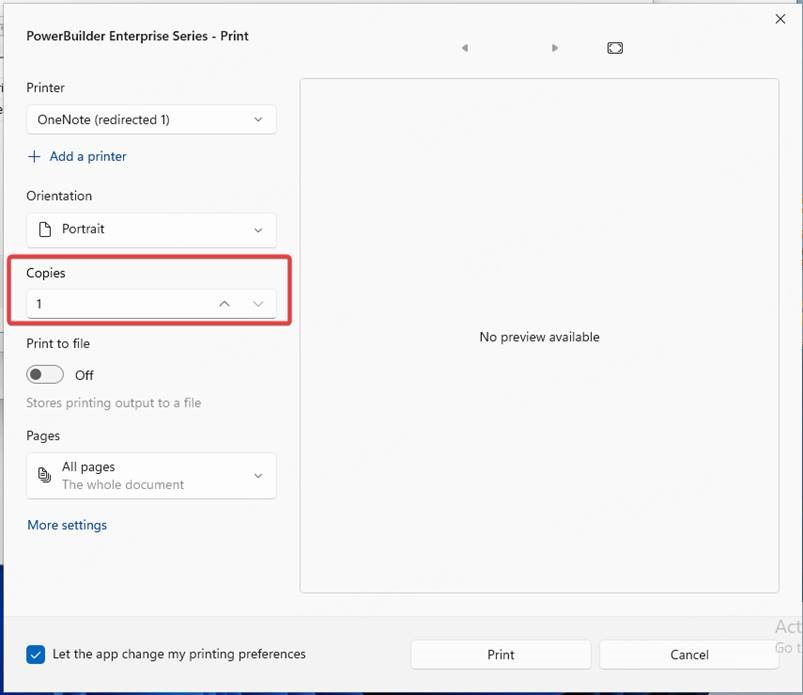
Windows 10 legacy print dialog: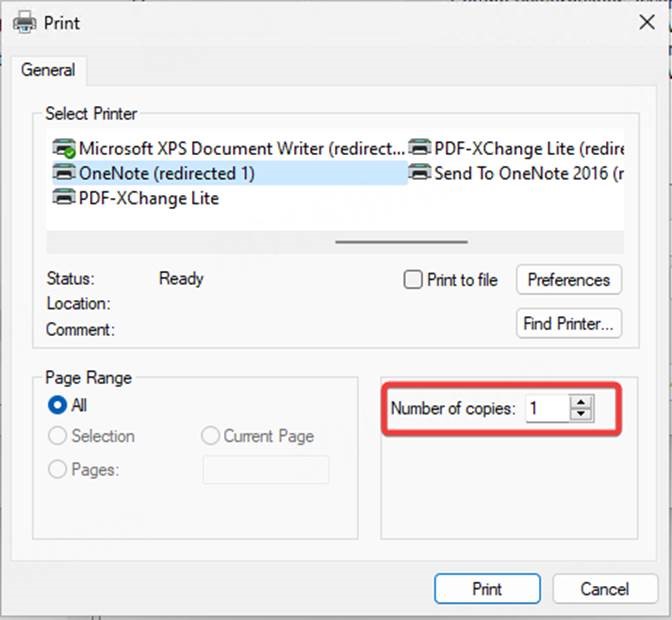
Resolution
Use either of the following solutions:
Solution 1: Configure specific PowerBuilder applications to use the legacy print dialog
Add the executable paths of the affected PowerBuilder applications to the PreferLegacyAppList registry value.
Registry location:
HKEY_CURRENT_USER\SOFTWARE\Microsoft\Print\UnifiedPrintDialog
Steps:
1. Create a new REG_MULTI_SZ value named PreferLegacyAppList.
2. Add the full paths of the PowerBuilder application executables, with each path on a separate line.
Example:
C:\Program Files\program1\program1.exe
C:\Program Files\program2\program2.exe
C:\Program Files\program3\program3.exe
Solution 2: Restore the legacy print dialog for all applications
Registry location:
HKEY_CURRENT_USER\SOFTWARE\Microsoft\Print\UnifiedPrintDialog
Steps:
1. Create a new REG_DWORD value named PreferLegacyPrintDialog.
2. Set PreferLegacyPrintDialog to 1.
3. Close the Registry Editor.